
The evaporator fans: what a stopped fan does to the box and the coil, and how to tell it from a normal pause
By Vimal Bhaya, Founder and Lead Systems Architect · Last reviewed 20 October 2026
This is a continuation of Walk-in refrigeration parts, a 14-part tutorial. You are on part 9 of 14.
The evaporator fans pull the box's air through the cold coil and throw it back out cold. Without them, the coil cools only the air touching it. A stopped fan warms the box within hours, unevenly, and its patch of coil often ices.
Not every still fan is a fault. Fans stop on purpose during a freezer's defrost and for a few minutes after it, and on many reach-ins when the door opens. Outside those times, a fan that is still while the compressor runs is a same-day call.
The fans carry the cold from the coil to the food
The coil is where the cold is made. The fans are how it reaches the food. In the drawing below, they are the fan inside the box: they pull the box's air through the cold coil and throw it back out cold.

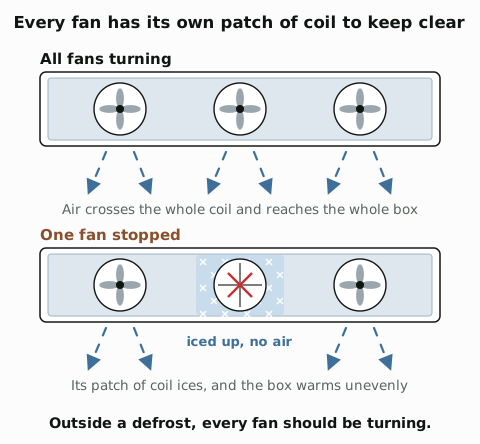
Most unit coolers have a row of fans, and each fan has its own patch of coil. When one stops, its patch stops working, and the part of the box it served goes without.
In a cooler, the fans keep running while the cooling rests. That warmer box air clears the coil's light frost every time. In a freezer, the fans stop during defrost and stay off until the coil is cold again, so they do not blow warm, wet air round the box. That wait is the fan delay. One controller maker's default restarts them once the coil is below 20°F (-7°C). Heatcraft's switch lets them run once the coil is below about 35°F (2°C).
US federal rules require the evaporator fan motors on walk-ins built since 2009, under 1 horsepower and under 460 volts, to be electronically commutated motors, the efficient brushless kind, or 3-phase motors.
A fan fault shows up in four common ways
Each one leaves part or all of the coil without air. The troubleshooting pages show where each sits among the other reasons for the same symptom.
What the readings show | What you see | Fault | Where it is covered |
|---|---|---|---|
The box warms within hours, and unevenly | One fan still while the others turn, outside a defrost. A motor can also stop and start as it overheats | A failed fan motor | |
The same: warm within hours, worst near that fan | Ice in front of one fan, and that fan not turning | A fan iced in | |
A defrost bump that never comes back down | All the fans still, the coil clear and cold, the compressor running, long after defrost should have ended | Fans that stay off after defrost | |
A freezer that warms, and stays warm | On a reach-in freezer, a fan blowing while the defrost heater is on, and a coil still frosted after it | A fan that runs through defrost |
The last two are usually not the fan itself. The fan delay switch, or the controller's fan settings, tells the fans when to run. The same switch also ends defrost on many walk-in freezers, which is why a defrost that does not finish and a termination switch that sticks can share the fault.
Here is what a stopped fan does to the rest of the refrigeration system
Without its fan, a patch of coil cools only the air touching it. The rest of the system feels it fast:
- The box warms within hours, not days, and unevenly. Food near the stopped fan warms first.
- The coil ices in front of the stopped fan. No air carries its cold away, and in a cooler, no air clears its frost when the cooling rests.
- The compressor runs longer, chasing a setting the box can no longer reach.
- On an open display case, the air curtain across the front breaks, and the store's warm air gets in.
A stopped fan is a same-day call
A stopped fan is one of the fastest faults a box can have. Keep the door shut, and probe the food near that fan first. Do not poke at the fan or the ice round it.
A still fan is not always a fault
There are three normal times for a fan to stand still:
- During a freezer's defrost, and for a few minutes after it, until the coil is cold again.
- While the door is open, on many reach-ins and on walk-ins with a door switch, so the fans do not blow cold air out of the door.
- While the cooling rests, on some reach-ins. Most reach-in coolers run their fans all the time, but some controls stop them in the off cycle.
"Most annoying door alarm? This is war"
r/refrigeration, thread title
That thread is about a walk-in controller whose door switch stops the fans while the door is open. Outside those three times, every fan should be turning.
A stopped fan shows in hours, and a stuck fan delay shows after each defrost
A failed fan does not build up slowly the way a dirty condenser or a small leak does. The box starts warming within hours of the fan stopping. A sensor near the stopped fan climbs first and furthest.
Fans that stay off after a defrost leave a different mark. A normal freezer's defrost bump is back down within 1 to 2 hours, as on how a walk-in freezer works. With the fans stuck off, the bump never comes back down: the coil is cold, but no air crosses it.
A walk-in cooler that lost its night ripple and sat flat near 39°F (4°C) for a night is on walk-in cooler troubleshooting. A stopped fan is one of the usual reasons for that shape.
You can check the fans from the floor
- Look at each fan in turn, from the floor. Outside a defrost, all of them should be turning.
- On a freezer, look again an hour after a scheduled defrost starts. The fans should be turning by then.
- On a reach-in, listen at the closed door while the compressor runs. Silence with the door open is normal on many models.
- Look for ice in front of one fan. It usually means that fan has stopped.
- Keep the front of the unit clear. Boxes stacked against the coil block the air the same way a stopped fan does.
If a fan is still outside a defrost, call a technician today. The motor, its wiring and the fan delay are a technician's job. Never chip ice from round a fan.
Every unit has evaporator fans, and each uses them differently
Unit | The fans | What goes wrong | More on this |
|---|---|---|---|
Walk-in cooler | A row of fans in the unit cooler under the ceiling, running all the time on most coolers | A failed motor, a fan iced in | |
Walk-in freezer | The same, stopped for each defrost until the coil is cold again | A failed motor, a fan delay that keeps them off | |
Reach-in cooler | One fan behind a guard inside the cabinet. On many models it stops when the door opens | A stopped fan leaves the cold at the coil | |
Reach-in freezer | One fan, off for defrost. Continental's stays off about 20 minutes, until the coil is near 32°F (0°C) | A fan that runs through defrost and blows the heat away | |
Prep table | A fan in the base. On forced-air rails it also blows across the pans | A stopped fan warms the base and the rail | |
Display case | A row of fans that blows the air curtain across the front of an open case | A dead fan breaks the curtain, and the store's air gets in | |
Reefer | Large fans in the unit that blow air down the trailer | Boxes loaded against the unit cut off the air |
The simpler way: TemperatureWise watches for a stopped fan
Everything on this page takes time, and you have to know what to look for. TemperatureWise takes that complexity out:
- It learns each box. It uses machine learning on the full temperature history of each box, and learns that box's own pattern.
- It watches for a stopped fan. In the readings, that looks like a box that warms within hours, or a defrost bump that never comes back down.
- It names the likely culprits. When it sees that change, TemperatureWise tells you what has changed and the top three likely parts at fault, so you know where to look.
It does not replace your technician. It tells you which one to call, and when.
This is one of our walk-in refrigeration parts pages. The evaporator coil page covers the coil the fans blow through.