
Free, no purchase needed
A free review of your temperature history
Your old readings already hold the warnings. Send us the temperature history from your current monitoring system or data loggers, and we will read it unit by unit, the way TemperatureWise reads live readings: which equipment is drifting now, which was repaired before and when it started, and how often a simple alarm went off for nothing. It is free, and you do not have to switch.
How it works
Three steps, and nothing to install
You send the export
A CSV or spreadsheet from your monitoring system's app or website, or from your data loggers. Thirty days of one room is enough to start; a year of every unit is better.
We read every unit
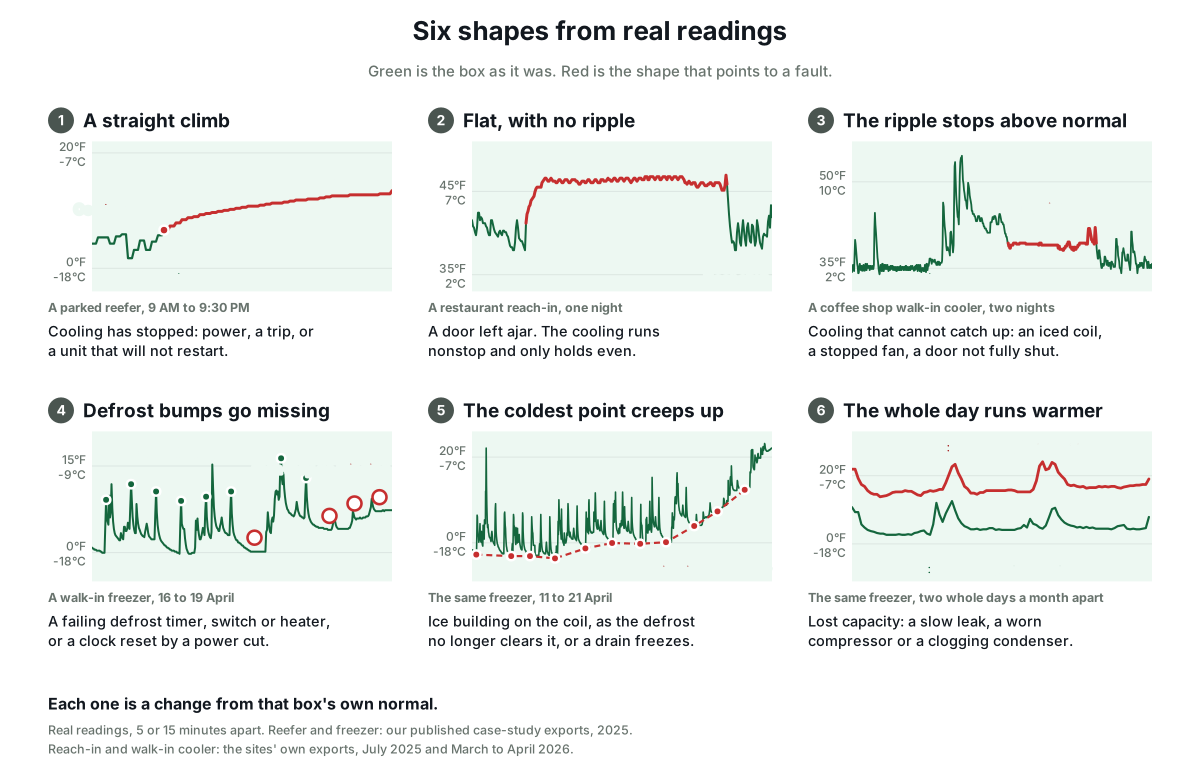
We look for the shapes faults leave in readings: a straight climb, a ripple that stops, defrost bumps that go missing, a coldest point that creeps up day by day, recovery that gets slower after each door opening.
You get what we found
Unit by unit, with the charts: what looks normal, what is drifting now, and the dates of past faults, so you can check our reading against what your technician found.
The kind of thing we find
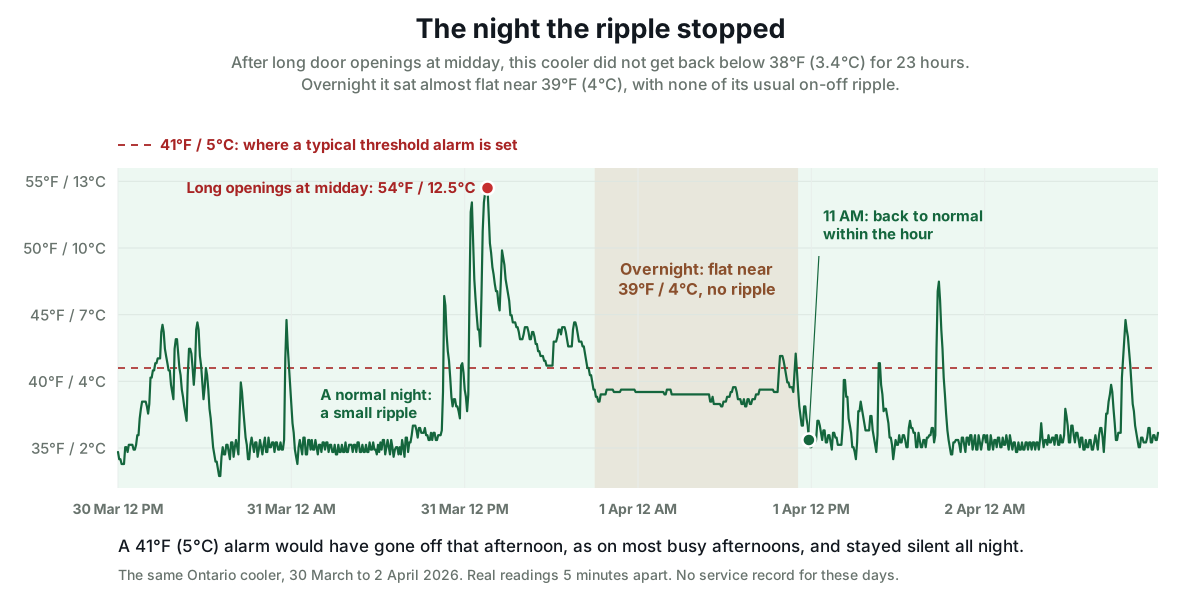
A walk-in that stopped cycling one night, and an alarm that stayed quiet
From one coffee shop's walk-in history: for 23 hours it never got below 38°F (3.4°C) and sat just under the 41°F (5°C) alarm line, so the alarm never went off. In the same 46 days, that alarm would have gone off on 39 days, almost always from the door.
What you can send
Any system, any logger, any length of history
A monitoring system
Most apps and websites export a CSV of every reading. Switching from Temp Stick, Monnit, SmartSense, MarCELL or another system? The same export moves your history into TemperatureWise, free, if you do switch.
The alternatives, system by systemData loggers
The download from each logger, as a CSV or spreadsheet. Tell us which unit each logger sat in.
Humidity too
If your system recorded humidity, send it. In a cold room it often shows a failing door seal or an icing coil before the temperature moves.
Temperature and humidity monitoringStraight answers
What the review is, and what it is not
It reads temperature
We see what the readings show. We do not see pressures or amps, so we say what changed and where to look, and a technician confirms the cause.
It is free
No charge, no purchase needed, and no obligation to switch. If the review is useful, that is the pitch.
It works best with notes
Tell us when repairs happened, if you know. Checking our reading against what a technician actually found is the fastest way to trust it, or not.
Ask for a review
Tell us what you have, and we will ask for the export
We reply by email to arrange how to send the file.
Common questions
Nothing. There is no charge, no purchase needed and no obligation to switch to TemperatureWise.
An export of your readings as a CSV or spreadsheet, from your monitoring system's app or website or from your data loggers, with a note of which unit each sensor or logger was in. Thirty days of one room is enough to start.
Any that exports its readings with a time and a value, which most do. That includes the systems on our alternatives pages. If yours does not export, tell us and we will look at it together.
Unit by unit, with the charts: which equipment looks normal, which is drifting now, and the dates of past faults the readings show, such as a defrost that stopped or a slow leak. We say what changed and where to look; a technician confirms the cause.
No. The review is free whether or not you switch. If you do switch, we import your whole history free, so the old readings sit in the same record as the new ones.
Rather talk it through first?
Book a short call and we will look at one unit's readings together, on the call.