
Cellular or Wi-Fi, and which link you are actually choosing
By Vimal Bhaya, Founder and Lead Systems Architect · Last reviewed 13 September 2026
This is a continuation of Which kind of monitoring to buy, a 5-part tutorial. You are on part 4 of 5.
The short answer: cellular is not a better sensor and it is not a better radio. It is a different way out of the building. It changes one link, between your site and the internet, and nothing about how the sensor reaches the gateway.
That is why the cost depends on where the cellular radio lives. TemperatureWise puts one at the site: $125 once and $50 a year per location, however many sensors sit behind it. Products that put a cellular radio in every device charge you again for every box.
And if you already have Wi-Fi you control, TemperatureWise charges nothing for connectivity. It is a line item you pick, not a product tier.
There are two radio links, and cellular only changes the second
Every monitoring system has two hops. Almost every argument about cellular confuses them.
- Sensor to gateway. Inside your building. This is where a walk-in's steel and foam panel eats signal, and it is decided by the radio in the sensor: Bluetooth, LoRa, Wi-Fi or Zigbee.
- Gateway to internet. Out of your building. This is decided by what the gateway connects to: your own broadband, or a cellular connection of its own.
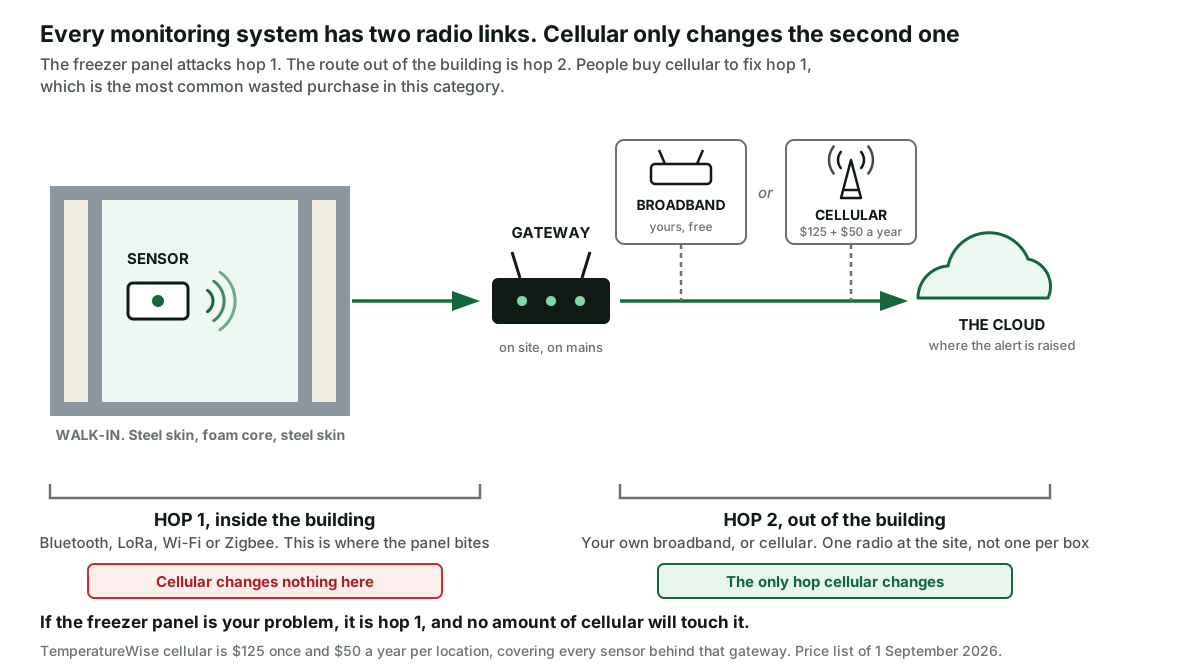
Cellular only ever means the second one. A cellular system still has to get the reading out of the freezer first. A mobile signal is no better at crossing an insulated panel than a Wi-Fi one. TemperatureWise set out the physics of that panel, with the decibel sums, on will wireless work through a freezer wall.
So "we need cellular because the freezer blocks the signal" is a line that sounds right and is not. If the panel is your problem, you need a different sensor radio. Not a different way out of the building.
TemperatureWise runs Bluetooth to a hub near the boxes, or LoRa to one gateway that covers a whole site. All four radios are compared on LoRa, 433MHz, Wi-Fi and Zigbee for cold rooms.
It is also not what fixes a cheap sensor dropping off the network, which is a Wi-Fi coverage problem inside the building. TemperatureWise went through that on consumer sensors or commercial monitoring.
TemperatureWise charges for cellular in three situations, and nothing in the rest
There is no internet at the site. A storage unit, a farm building, a container, a site where the landlord's Wi-Fi does not reach the back. This is the honest majority case.
The internet at the site is not yours. A shared building, a mall, a kitchen inside somebody else's premises. The Wi-Fi password changes and nobody tells you, and you find out three weeks later that the record has a hole in it.
You want the record to survive your provider failing. Broadband goes down on its own, without a power cut, and when it does your alerts go with it unless the gateway has another route.
What cellular does not buy you is a faster reading. That is the sensor's job, and it does not change. TemperatureWise entry sensors sample every minute and go into the record every five, on Wi-Fi or on cellular.
A cellular radio in every device charges you again for every box
Here is the part that decides the money, and it has nothing to do with signal quality.
Some products put a mobile radio, a SIM and a data plan inside every device. That is a clean design, and for one box it is a good one.
It also means the cost of getting online multiplies by the number of boxes, because every box carries its own.
TemperatureWise carries one radio, one SIM and one plan for everything behind it.
| Boxes at one site | TemperatureWise cellular | A per-device cellular product |
|---|---|---|
| 1 | $125 once, $50 a year | $209 once, $179 a year |
| 3 | $125 once, $50 a year | $627 once, $538 a year |
| 8 | $125 once, $50 a year | $1,672 once, $1,435 a year |
| What the second box adds | Nothing | A whole unit and a whole plan |
That is the connectivity line only, and the full TemperatureWise cost including monitoring is in the falls-short section below. Read both before you decide.
A per-device cellular monitor uploads its history in batches
Worth understanding, because it is a real property of putting cellular in a battery-powered device rather than a criticism.
One widely recommended cellular monitor publishes what it does. A reading every 10 seconds. Stored every 30 minutes on its pro model. And sent to the server every 4 hours. Alerts still go out at once when a limit is crossed. The history in the app is up to four hours behind.
That is the cellular trade in one line. A mobile radio is costly in power and in data, so anything running one on a battery talks in batches. If you want an alarm, the alarm is instant. If you want to open a chart and see the last hour, it is a different product.
TemperatureWise keeps the cellular radio in a mains-powered gateway instead, where talking often is cheap. The entry sensor samples every minute and goes into the record every five. The chart is current whether the site is on Wi-Fi or on cellular.
A battery in the gateway is useless unless the route out is cellular
This is the part that makes TemperatureWise pricing make sense. Worth explaining rather than just charging for.
In a power cut, four things are in the chain and they fail in a specific order. The sensor runs on its own battery in the box and does not care. The gateway is on mains. Your router and the provider's equipment out in the street are on mains. The mobile network and the cloud stay up on backed-up power. TemperatureWise drew the whole chain on what happens when the power goes out.
So a battery in the gateway on its own buys you nothing. The gateway wakes up on battery, reaches for the router, and the router is dead.
That is why the TemperatureWise backup power pack is only sold with cellular. A battery is worth fitting when the way out of the building does not also run on your mains.
Together they hold the site up through a cut. Separately, one of them is a decoration.
TemperatureWise prices connectivity as a line item, not a tier
- Your own internet: free. Most restaurants have Wi-Fi and should use it.
- Cellular: $125 once and $50 a year per location, covering every sensor at that location.
- Backup power pack: $125 per location, and it requires cellular, for the reason above.
The things worth paying TemperatureWise for are elsewhere. Alerts go to a list of people, and step up from email to text to a phone call that keeps ringing. That is covered on alerting more than one person.
One record covers every box on the site, with NIST-traceable calibration on request. And the detection is a proprietary mix of machine learning on the full temperature history, not just the current reading. A fault shows days before a limit is crossed.
Which to buy
| If you have... | Choose |
|---|---|
| One box, no internet at the site | A self-contained cellular unit is cheaper. See the falls-short section |
| Several boxes, no internet at the site | TemperatureWise on cellular. One connection, one bill, however many sensors |
| Good Wi-Fi you control | TemperatureWise on your own internet. Connectivity is free and we will not sell you a modem |
| Wi-Fi that belongs to somebody else | TemperatureWise on cellular, for independence rather than coverage |
| Frequent power cuts | TemperatureWise on cellular plus battery backup, because neither is worth much alone |
| A signal problem inside the freezer | Neither. That is the sensor radio, and cellular will not touch it |
| Enough sites that you are thinking about building it yourself | Price the connection per site first. See build your own or buy it |
If you are weighing a self-built fleet against buying, TemperatureWise costed the rest of that decision on build your own or buy it.
Where TemperatureWise falls short
For one box with no Wi-Fi, a self-contained cellular monitor is cheaper. One widely recommended unit is $209, with a plan you have to take at $14.95 a month billed yearly. That is about $1,106 over five years. TemperatureWise for one box with cellular is about $1,700.
It also carries its own rechargeable battery, published at roughly 24 to 48 hours, so one unit rides out a power cut with no gateway and no router involved. If one cold box in a place with no internet is the whole problem, buy theirs.
Cellular does not get a reading out of a walk-in. It starts at the gateway. If your sensor cannot reach the gateway, cellular changes nothing, and this is the most common wasted purchase in this category.
Cellular is not a guarantee. Coverage inside a concrete basement or a steel-clad plant can be worse than the Wi-Fi you were trying to escape. If the site is marginal, test it there before buying. Any vendor who tells you otherwise has not been to your site.