
What happens when the power goes out
By Vimal Bhaya, Founder and Lead Systems Architect · Last reviewed 9 September 2026
This is part 1 of 6 in What if the monitoring fails?, a short tutorial on whether the monitoring itself stays up.
As a simple answer: TemperatureWise sensors keep working through a power cut. Both sensors run on their own batteries, inside the box, and neither of them cares what the building is doing.
What stops is everything between the sensor and your phone. The hub or gateway, your router, and your internet provider's equipment out in the street are all on mains. Three of the four links in the chain go down, and the sensor is the only one anybody ever asks about.
You still get told. The alert that says a device has gone quiet is raised in the TemperatureWise cloud, not on your site, so it does not depend on the thing that just failed. What you lose without a backup is the record for those hours, not the warning. And the reading that lands the moment power returns is the one that tells you whether you actually lost anything.
The four things that all have to be working
Before any of this makes sense, it helps to know what is in the chain. A wireless monitoring system is four links, and they do not fail together.
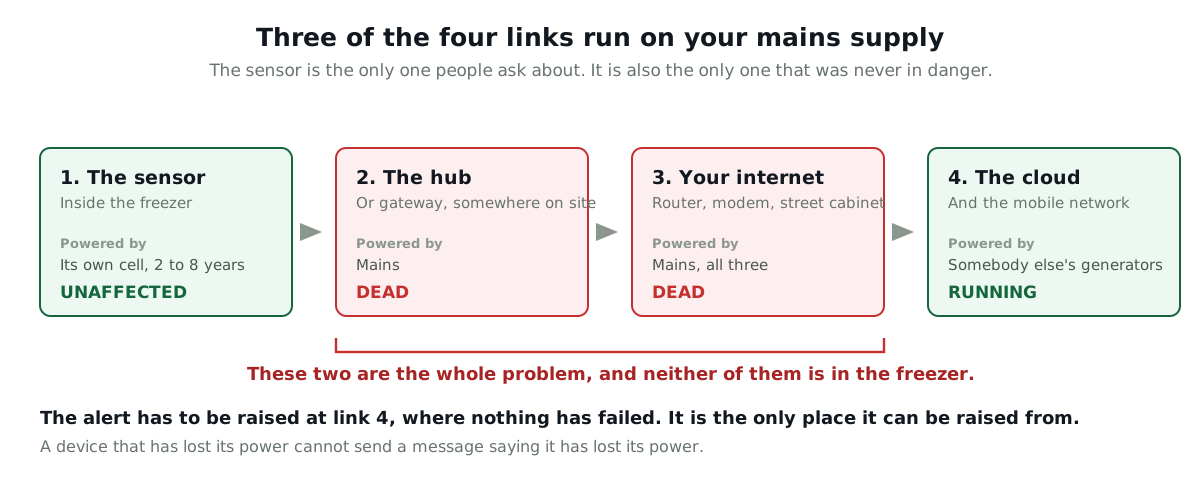
| Link | Powered by | In a power cut |
|---|---|---|
| The sensor, inside the box | Its own cell. About 2 years on the Bluetooth sensor, 5 to 8 on the LoRa one | Keeps reading. Unaffected |
| The hub or gateway, somewhere on site | Mains | Dead, unless it has a backup |
| Your router, modem and the provider's street cabinet | Mains, all three | Dead. This is the link people forget |
| The cloud and the mobile network | Somebody else's generators | Running |
An operator put the problem in one sentence in a thread about which system to buy:
"If the restaurant loses power and I don't have internet, that's when I'll need to be alerted."
Restaurant owner, asking what to buy before a vacation
He has spotted that the two failures arrive together, from the same cause, at the same second. That is what makes a power cut different from every other fault. The refrigeration and the thing watching the refrigeration both stop, and they stop for the same reason.
TemperatureWise sells two sensors, and both run on batteries inside the box
Worth saying plainly here, because it changes the numbers on this page and on several others.
The Bluetooth sensor costs $25, talks to a $50 hub, and runs about two years on ordinary cells. It suits a restaurant: a handful of reach-ins and a walk-in, with the hub near the boxes. Sometimes a site needs two hubs to cover everything, and that is the honest cost of a short-range radio.
The LoRa sensor costs $200, reaches a single gateway from anywhere on a site, and runs 5 to 8 years. It is the one for a cold store, a plant, or anywhere the inventory in one box is worth more than the whole monitoring system.
You get what you pay for, and that is not a slogan here. We built both because a restaurant holding $4,000 of stock and a distributor holding $250,000 are not the same buyer, and pretending otherwise just means the restaurant buys nothing.
For this page it makes almost no difference. Both run on batteries inside the box, and in a power cut both are fine.
Backup batteries in the device do not keep your router alive
This is the trap in most of the answers you will read. A product says it has backup batteries, and that sounds like the question has been answered.
Take the best-regarded Wi-Fi monitor in this market. ThermoWorks publish that their NODE runs on 3 AA batteries as a backup to its USB power, holds up to 70,000 readings in its own memory, and keeps its Wi-Fi settings through a battery change. That is a well-built device and it genuinely keeps working when the mains stops.
It also runs on 802.11b/g/n, 2.4 GHz Wi-Fi. Wi-Fi needs an access point. The access point is on mains, the modem behind it is on mains, and so is the provider's equipment down the road.
So the device is awake, storing readings, and talking to nobody. You find out on Monday.
One thing worth doing yourself, whatever you buy
If you are relying on ordinary alkaline cells anywhere cold, change them. Energizer's own handbook puts the bottom of the alkaline range at 0°F (-18°C), which is roughly where a freezer sits.
Energizer Ultimate Lithium is rated to -40°F (-40°C) and drops straight into the same slot. It is what TemperatureWise fits in its own sensors, and it is why they hold up in a deep freezer where the same device on alkalines would not. It is the L91 in AA and the L92 in AAA, it costs a few dollars a cell, and almost nobody thinks to do it.
That tip is worth more than most of this page if you already own a cheap sensor. The mechanism, and why a coin cell is a different problem again, is in battery or wired at -20°F.
The alert is raised in the cloud, not on your site
This is the part that decides whether any of the rest matters.
The alert has to come from the other end. A device that has lost its power or its internet cannot send you a message saying it has lost its power or its internet.
TemperatureWise sensors check in on a schedule, and the servers know that schedule. When the check-ins stop arriving, the alert is raised in the cloud, where nothing has failed, and sent out over a path that has nothing to do with your building.
It is the same escalation as a temperature alert, because it is the same seriousness: an email first, then SMS, then a phone call until somebody picks up. It is not a grey icon on a dashboard nobody is looking at on a Sunday.
Think of a night watchman who phones in every hour. You are not listening for bad news. You are listening for the call that does not come.
Whichever vendor you buy from, this is the question that separates them: where is the silence noticed? If the answer is anywhere on your site, the answer is nowhere.
What you lose without a backup, and what you keep
Here is the honest version for TemperatureWise, with nothing rounded in our favour.
| No backup | Backup pack and cellular | |
|---|---|---|
| Do you get told | Yes, from the cloud, when the check-ins stop | Yes, and the first message says the mains has gone rather than the site has |
| Do you keep reading the temperature | No. The sensor is still taking readings, but they have nowhere to go | Yes, right through |
| The record afterwards | No readings for the outage. The chart joins the last one to the next one | Continuous |
| When power returns | It comes back on its own. Nothing to re-pair by hand | Nothing happened to come back from |
| Cost | Nothing | $125 backup pack, plus $125 for cellular and $50 a year, per location |
The two options are sold together on purpose and it is not a bundle trick. Backing up the gateway while your router is dead buys you nothing at all, because the gateway would have a full battery and no way out of the building.
What that missing stretch of record actually looks like, and how to read a chart that has one in it, is the subject of what happens when the internet goes out. It is worth five minutes before an audit rather than during one.
A loaded freezer holds for hours, not minutes
Long enough that a few hours of outage is not the emergency it feels like, which is worth knowing before you spend anything.
We have this measured rather than guessed. Our Mississauga reefer case study is a loaded, sealed, stationary trailer with its cooling completely off for the best part of a day. It warmed at 1.3°F (0.7°C) an hour across the first twelve hours, and at its steepest four hour stretch it managed 2.1°F (1.2°C) an hour.
| Rate | Where it comes from | Hours to climb 10°F (5.6°C) |
|---|---|---|
| 1.3°F (0.7°C) an hour | Loaded reefer, first 12 hours, measured | About 8 |
| 2.1°F (1.2°C) an hour | Same trailer, its worst 4 hour stretch | About 5 |
| 9°F (5°C) an hour | A walk-in in a total summer failure, doors in use | Just over 1 |
The spread in that table is the point. A full box that nobody opens gives you most of a working day. The same box with staff going in and out, in July, gives you an hour.
An empty freezer has almost none of this margin. Cold air holds very little heat compared with a pallet of frozen product, so a lightly loaded box climbs several times faster than the figures above.
The first reading after the power returns is the one that matters
This is the practical part, and it is why a short outage is usually a non-event even without a backup.
You did not see the temperature during the gap. You do see it the moment the system comes back, and that reading tells you where the box actually got to. The freezer cannot have been warmer during the outage than it is at the end of it, because with the cooling off it only moves one way.
So a two hour cut that ends with the box at 4°F (-16°C) is a two hour cut where nothing reached an unsafe temperature. You do not need the missing readings to know that. You need the one on the far side of them, and you have it.
That is a genuinely useful thing to be able to tell an inspector, and it is more honest than any reconstruction of the gap would be. Where it stops working is a long outage, or one that ends with the box already warm, and at that point the missing hours matter and you should have bought the backup.
The reason this reasoning holds at all is thermal inertia, the same effect that lets you drive home from the shops with frozen food in the boot. We go through it properly in glycol buffers and why air temperature lies.
The outage is not the dangerous part. The restart is.
This is the section nobody writes, and it is the one that costs people money.
Refrigeration does not always come back. A compressor can fail to restart against a high head pressure, a control board can come up in a fault state, and a defrost timer can come back at the wrong point in its cycle. Our Mississauga case study is literally a unit that would not start.
What that means in practice: the power came back at 2am, everybody assumed the problem was over, and the box quietly kept warming.
So the reading you want is not just the first one. It is the trend over the next hour, showing the box pulling back down. If it is flat, or still climbing, you have a second failure sitting on top of the first, and you now have far less runway than you did at the start.
This is also the case where watching the slope rather than the number earns its keep, because the box can be well inside its limits and heading the wrong way.
Four questions to ask any vendor, with the TemperatureWise answers
Every one of these is a fair question to put to us as well, so the answers are printed rather than promised.
- If my building loses power, where is the alert raised? Anywhere on site is the wrong answer. TemperatureWise raises it in the cloud, and escalates email, then SMS, then a phone call.
- What is in the record for the hours the power was out? TemperatureWise has no readings for that stretch unless the backup package is fitted, and the chart joins the last reading to the next one.
- What exactly is the backup on? The sensor, the gateway, or the internet. These are three different things and only the last one keeps data flowing. The TemperatureWise backup pack is $125 per location and powers the gateway, and it needs the cellular package at $125 plus $50 a year to be worth anything.
- Does anything need re-pairing by hand when power returns? Nothing on a TemperatureWise site. It reconnects on its own.
What none of this fixes
A backup keeps the monitoring alive. It does nothing whatsoever for the refrigeration. If you want the box to stay cold you need a generator or a transfer switch, and that is an electrical project with a different budget. We are selling you the ability to know, not the ability to cool.
Cellular is not immune either. A storm big enough to take out a region takes mobile sites with it, and their own batteries are sized in hours. Cellular is much better than a router in a cupboard. It is not a guarantee.
A backup pack buys you the outage, not the week. It is sized in hours at your gateway's draw, so ask for the runtime figure for the unit you are quoted rather than accepting the word backup on its own.
And an alert is only worth the person who answers it. A power cut at 3am is exactly the case where a single phone number fails, which is the subject of alerting more than one person.