
How long installation actually takes
By Vimal Bhaya, Founder and Lead Systems Architect · Last reviewed 9 September 2026
This is a continuation of What if the monitoring fails?, a 6-part tutorial. You are on part 5 of 6.
A TemperatureWise install takes 30 to 60 minutes for a mid-sized restaurant: two walk-ins, four sensors, one gateway, your own Wi-Fi. No electrician, no shutdown, no holes in anything, and nothing comes out of the box.
It is a self-install. If you have set up a Wi-Fi router at home, this is the same level of job. TemperatureWise works out the sensor placement in advance from your floor plan, so on the day you are following a plan rather than making decisions on a step ladder.
The alternative, running a wired probe through the wall of each box, is a call-out charge plus about an hour per walk-in. For a five box site that is $525 to $650 in labour before any hardware, and a permanent hole in an insulated panel.
The question, in the words people actually use
In a thread about which alarm system to buy, after the prices had been argued about, somebody asked the question that decides it:
"Was it a pain to setup?"
Restaurant owner, shopping for a walk-in alarm
It is a fair question and the suspicion behind it is earned. Most facility technology is a pain to set up. A system that needs an electrician, a network change and a morning with the walk-in switched off is a project, and projects get put off until after something has already gone wrong.
Where the hour actually goes
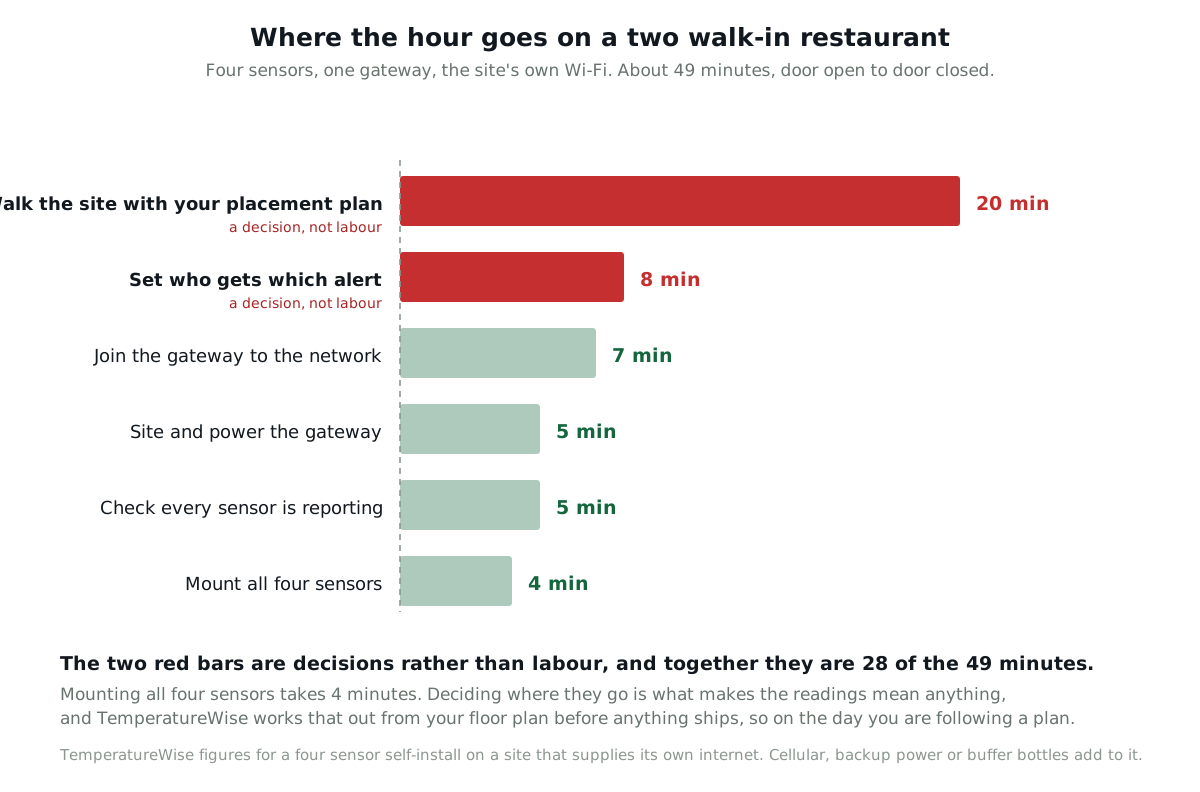
Here is the honest breakdown for that mid-sized restaurant. Two walk-ins, four sensors, one gateway, their own Wi-Fi.
| Step | What it involves | Time |
|---|---|---|
| Walk the site with your placement plan | Which boxes, how many sensors in each, and exactly where in each box. Worked out in advance from your floor plan | 15 to 25 min |
| Mount the sensors | In its protective case, on a magnet, an adhesive pad or one screw | About 1 min each |
| Site and power the gateway | Somewhere central, on a shelf or a wall, into an ordinary socket | 5 min |
| Join the gateway to the network | Wi-Fi or Ethernet. Nothing if you took cellular | 5 to 10 min |
| Confirm every sensor is reporting | Standing in the room, watching readings land | 5 min |
| Set who gets which alert | Per sensor. Which box wakes which person, and in what order | 5 to 10 min |
Look at which two rows are marked. The mounting is the trivial part, and it is the part everybody asks about. The two steps that decide whether the system is any use are decisions rather than labour, and the reason the first one goes quickly is that the decision was already made.
TemperatureWise designs the placement before anything ships
Send a floor plan. It does not have to be a drawing: a sketch with the boxes and the doors marked is enough. TemperatureWise works out how many sensors each box needs, where in each box they go, and where the gateway should sit, and sends that back as a plan.
So the visit is not a survey. You are walking the site with a plan in your hand and putting sensors where it says.
The install can be checked remotely too. Every reading that arrives at the gateway carries a signal level with it, so TemperatureWise can see from the office whether a sensor is comfortably in range or scraping through, without anybody driving anywhere. If one is marginal you get told to move it while you are still standing there.
Sensors go in a protective case, and placement keeps them out of the way
A walk-in is a working room. Pallets go in, boxes get stacked, and somebody doing a stock count at the end of a long shift is not looking out for a small white device on an upright.
So every sensor is fitted inside a protective plastic case, which takes a knock without the sensor caring. And the placement plan puts them where the knock is less likely in the first place: clear of the loading path, off the shelf edges where a pallet corner swings through, and away from the spots that get used as a shelf when the room is full.
That is a small thing that decides whether a system is still fully working in year two.
Why there is no electrician and no downtime
Three things, and each one removes a category of work rather than speeding it up.
Nothing inside the box needs power. The sensor runs on its own cell for 5 to 8 years, so there is no wiring to run into a cold room and no outlet to find. Which chemistry survives down there, and why most consumer sensors do not, is in battery or wired at -20°F.
Nothing needs drilling. The radio passes through the panel, so the sensor goes inside and the gateway sits anywhere on site. That is the whole subject of will wireless work through a walk-in freezer wall, and it is the reason this install is measured in minutes rather than visits.
There is one thing to plug in, not one per room. With the LoRa sensor a single gateway covers the whole site, whether you have two boxes or nine. With the cheaper Bluetooth sensor the hub has to sit nearer the boxes, so a restaurant sometimes needs two of them, and that is the honest cost of a short-range radio. Either way it is a socket, not an electrician. The site-scale version of that argument is in metal walls, long spans and multi-room sites.
And the one that matters most for disruption: we never touch the refrigeration. This is not a controller. Nothing is wired into the unit, no circuit is interrupted, and no setting is changed. So the box never has to be emptied, it never comes up to temperature, and service continues while somebody is standing on a step ladder sticking things to a shelf.
What the alternative costs, in money and in holes
The traditional way to monitor a walk-in is to mount the transmitter outside and run a probe through the wall. It is a sound design and we said so in the battery article, where we costed it out.
| Line | Cost |
|---|---|
| Call-out minimum, before anybody picks up a drill | $150 |
| 45 min to an hour a box, five boxes, at $100 an hour | $375 to $500 |
| If it all happens in one visit | $525 to $650 |
| If it takes more than one visit, because areas have to stop separately | Up to $1,250 |
The costs that are not money are worth as much attention.
A walk-in panel is a foam core between two thin steel skins. An unsealed penetration through it is a permanent cold bridge, and warm moist air that finds its way into that path will condense and then freeze inside the wall. Done properly it is sealed and fine. Done in a hurry on a Friday it is a wet patch that appears six months later.
Then there is a cable to route, which is a thing to snag and a thing an inspector will look at, and a mains outlet needed within reach of every box, which a lot of kitchens simply do not have.
None of that makes the wired approach wrong. For one critical freezer it is a fair trade and we would tell you to do it. Across twelve boxes it is the reason a rollout stalls.
Six things that make an install take longer
Said plainly, because every one of these has happened.
- No Wi-Fi, or an IT department with a change process. This is the big one, and it is measured in days rather than minutes. Cellular sidesteps it entirely for $125 once and $50 a year per location.
- Cellular or battery backup. Add 10 to 15 minutes at that location for the hardware and a signal check in the room where the gateway will actually live.
- Buffer bottles. Add a few minutes each, plus a real conversation about what is stored in each box, because the right buffer for cases of frozen protein is not the right one for fresh produce.
- A large or multi-building site. That wants a walk with a floor plan before anybody brings hardware, not during.
- Boxes packed to the ceiling. You need a position that stays clear when the delivery arrives, and finding one takes much longer than mounting.
- Nobody on site who can decide. If the person who knows which box holds what is not there, the placement gets guessed and somebody comes back. This is the most common cause of a second visit and it has nothing to do with the equipment.
The first week is spent learning your boxes, and TemperatureWise does it for you
At the end of the hour everything is mounted, everything is reporting, and alerts are on. The system is installed. It takes about another week before the alerts are worth trusting, and it is worth knowing why.
Every box has its own normal. The big freezer defrosts at quarter past four in the morning and quarter past four in the afternoon, and briefly touches 20°F (-7°C) doing it, with nothing wrong at all. The cooler by the back door climbs every Tuesday because that is when the delivery lands.
Set one fixed limit on day one and you get two alerts a day for a freezer that is working perfectly. Within a fortnight everybody ignores them, which is the failure the whole of why temperature alarms cry wolf is about.
TemperatureWise does that adjustment automatically. Over the first week it learns each box's own pattern, including when it defrosts and how far it climbs doing it, and sets the thresholds around that pattern rather than around a number somebody guessed. You are not tuning anything, and you are not getting ten alarms a day while it settles.
Four questions to ask any vendor, with the TemperatureWise answers
- Does anything need to be wired, drilled, or switched off?
TemperatureWise: no to all three. The sensors are battery powered, the radio crosses the panel, and the refrigeration is never touched, so nothing comes out of the box. - Who decides where the sensors go?
TemperatureWise: we do, from your floor plan, before anything ships. If placement is left to whoever opens the carton, that is a real risk handed to you quietly. - How long before the alerts are tuned, not just switched on?
TemperatureWise: about a week, and it happens automatically as the system learns each box's pattern. You are not adjusting thresholds by hand. - What happens when I add a walk-in next year?
TemperatureWise: on the LoRa tier one gateway covers the site, so it is a $200 sensor and a placement decision. On the Bluetooth tier a room at the far end of a building can also need a second $50 hub.
What this does not cover
A new build or a fit-out is a different job. There you want placement decided from the drawings while the racking layout can still change, which is better than any retrofit and takes a different kind of hour.
Sites with an existing BMS or BAS are an integration, not an install. Readings can appear as ordinary BACnet points alongside everything else your facilities team already watches, so cold storage stops being the one system living in its own app. TemperatureWise provides the BACnet integration as an additional service, quoted separately, and it is a conversation with your facilities team rather than a forty-five minute visit.
Connecting to sensors you already own changes where the time goes. There is nothing to mount, and the effort moves to working out what your existing hardware can be read from and how reliably.
And a fast install does not make placement unimportant. It makes it recoverable. A sensor stuck on with a magnet can be moved in thirty seconds when you discover it is in the evaporator's discharge and reading two degrees colder than the food. A probe through a wall cannot. That is the real argument, and where to put a sensor in a walk-in is the page to read next.