
Metal walls, long spans and multi-room sites
By Vimal Bhaya, Founder and Lead Systems Architect · Last reviewed 7 September 2026
This is a continuation of The physical reality, a 6-part tutorial. You are on part 3 of 6.
On a real production floor the far freezer is 208 ft (63 m) from the network cabinet, through ten interior walls, and then through the freezer panel itself. Wi-Fi does not make that trip.
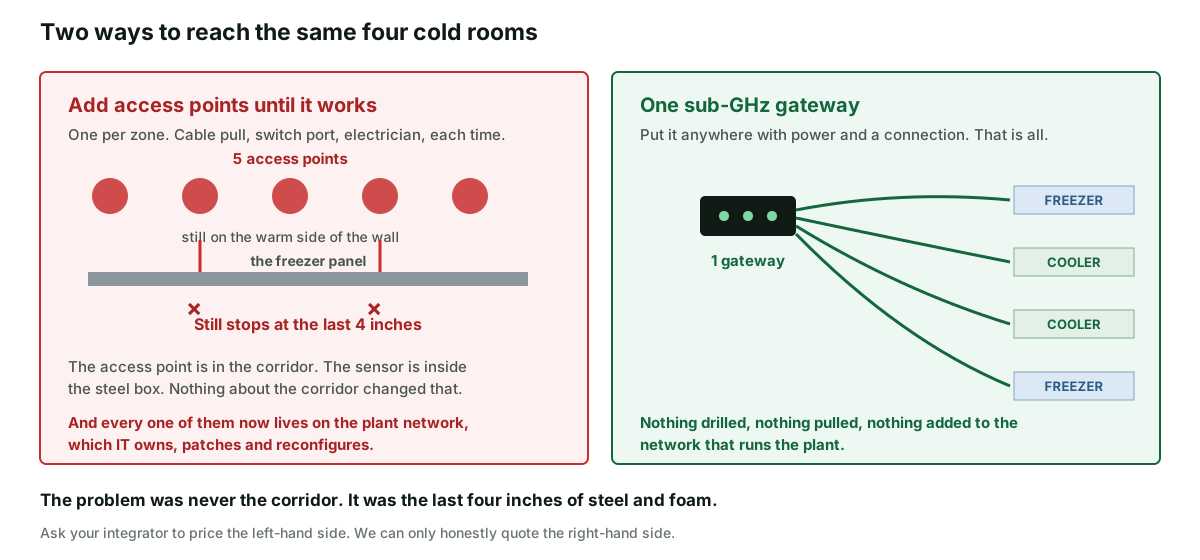
The usual answer is to add access points until it does. That does not work here, because the barrier is not the corridor. It is the last four inches of steel and foam, and an access point in the corridor is still outside the box.
What does work is one radio with enough margin to cross the whole thing in a single hop. One gateway, anywhere on site with power, reaching every cold room. Nothing drilled, and nothing new on the network that runs your plant.
A real site, with the distances on it
This is a working food production facility, 190 ft by 95 ft (58 m by 29 m). The four cold rooms run down one side. The network cabinet is in the office in the opposite corner, because that is where network cabinets go.
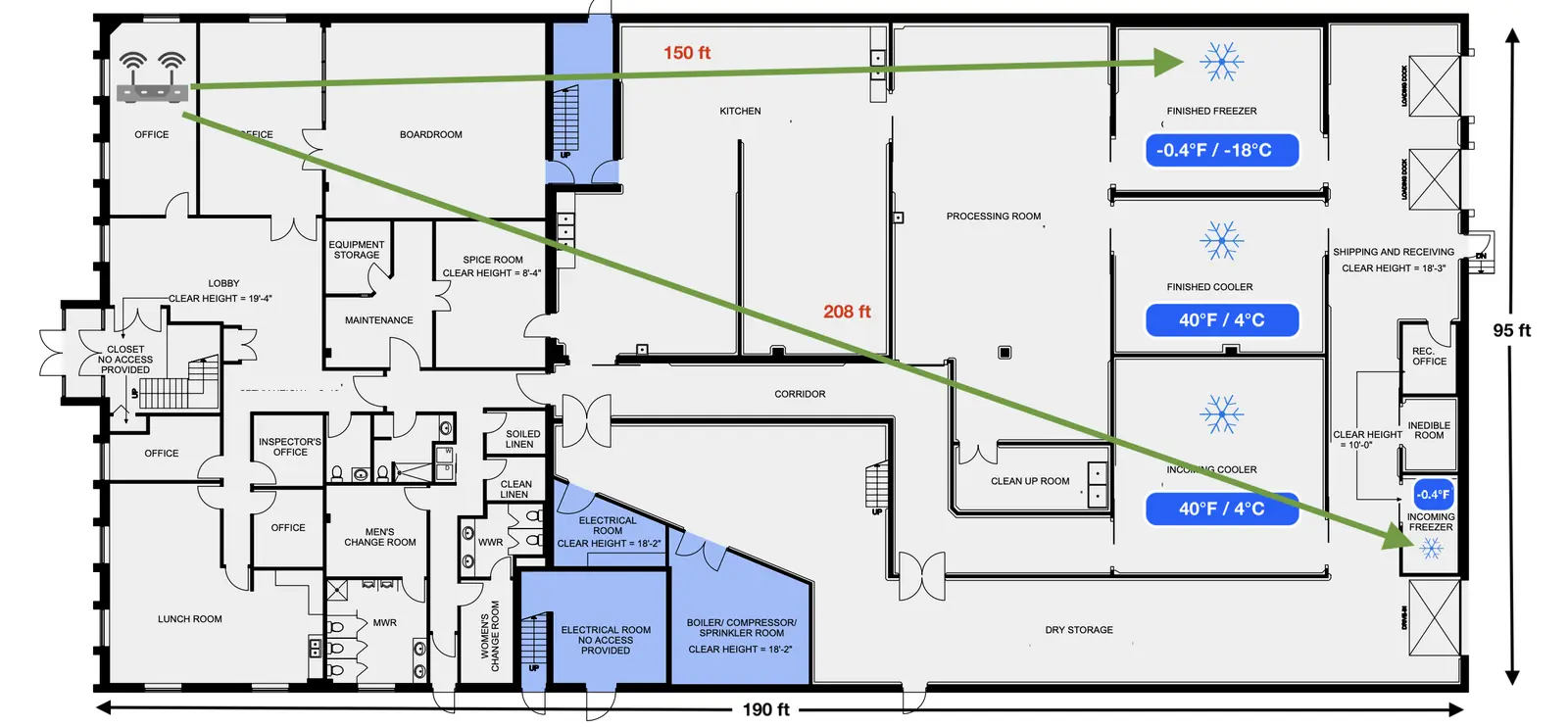
Nothing about that layout is unusual. Offices go at the front, cold rooms go at the back next to the loading docks, and the two ends of the building are as far apart as the building allows.
This is not only a food problem. From a safety manager trying to monitor a 160,000 sq ft manufacturing plant:
"There is metal walls in between half of the manufacturing floor."
Safety manager, r/SafetyProfessionals
Why adding access points does not fix it
The instinct is right in general. If a signal will not reach, put a transmitter closer. It is the wrong instinct here for three separate reasons, and they stack.
1. The barrier is the panel, not the distance
An access point in the corridor is outside the freezer. So was the one in the office. You have moved the transmitter 150 ft closer and left the actual obstacle exactly where it was.
A walk-in panel is an insulation core with a sheet of metal on each face, and that metal is what stops a 2.4 GHz signal. The first article in this tutorial covers why in full.
2. Every access point joins the network that runs your plant
This is the one that bites later, and nobody mentions it during the sale.
Your site network is not idle. It carries production systems, the label printers, the scales, the card readers, the cameras and the guest Wi-Fi. It is owned by IT, or by an outside provider, and it is maintained the way networks are maintained: patched, re-keyed, re-segmented, and occasionally rebuilt on a Sunday.
Put your temperature monitoring on it and you have made cold chain safety a dependent of all that. When somebody rotates a Wi-Fi key, closes a VLAN or replaces a controller, your sensors go quiet.
And a monitoring system that goes quiet does not look broken. It looks fine. There are no alarms, because there is nothing arriving to alarm about. That is worse than having no monitoring, because now you believe you are covered.
3. It is five things to install instead of one
Each access point wants a cable pull, a switch port, a mounting position, power and somebody qualified to do it. In a food production area that is also a hygiene job and a scheduling job, because the work has to happen when the line is down.
What it costs, as honestly as we can put it
We are not going to invent a price for somebody else's access points. Here is the comparison in counts, and our own side in real numbers.
| An access point per zone | One sub-GHz gateway | |
|---|---|---|
| Devices to install | About 5 | 1 |
| Cable pulls and switch ports | One each | One |
| Trade visits into food areas | One each | One |
| New devices on the plant network | 5 | 1 |
| Enough margin to cross the freezer panel | No | Yes |
| What we can quote you | Nothing. Ask your integrator | Gateway $250, sensors $200 each, monitoring $250 per sensor a year |
For the four cold rooms on that plan, our side is $1,050 up front and $1,000 a year, which is the worked example on the TemperatureWise pricing page. Prices are from the September 2026 list.
The point of the table is not that our column is smaller. It is that the left-hand column buys you five devices that all stop at the same wall.
Adding a cold room means adding a sensor, not more hardware
That is the practical difference, and it is worth saying on its own.
The gateway is already listening to the whole site. So the sixth freezer costs you a sensor. There is no repeater to add, no cable to pull, and nothing new for anyone to configure.
The same is true of a trailer parked at your dock. A reefer running in the yard is a cold room that nobody put a sensor in, and it is outside the reach of any Wi-Fi you have. Here it is just another sensor, with no outdoor access point and no second network.
That case is worth naming because it is where people forget to look. One of our own published failures is exactly that, on a holiday weekend.
What we will not promise you
Range figures are always "up to". Ours included. A cold store racked to the ceiling in steel, a freezer inside a freezer, or a plant room below grade will all take more out of a signal than an open floor does. We would rather quote a second gateway than a number that only holds in a photograph.
So we map the site rather than guess at it. We work from your floor plan, we check the rooms that look difficult, and we tell you how many gateways it actually takes. Sometimes that is one and we say so. Sometimes it is two, and it is better to know that before the invoice than after the first quiet weekend.
One gateway is one point of failure. If it loses power or its connection, every sensor behind it goes quiet at once. Our honest answer is that you can add a battery backup for $125 per location and a cellular connection for $125 plus $50 a year, and that without one of those we go quiet in a power cut like everything else. Anyone who tells you otherwise is selling.
And a plan is not the same as a week of real data. A drawing gives us distances and wall counts. It does not show the steel mezzanine nobody drew, or the pallet rack that went in last year. So the mapping gives you the number, and one sensor left in your worst box for a week confirms it before you commit to the site.
Where to start on your own site
- Get a floor plan, or draw one on paper. Mark where the network cabinet is and where every cold room is.
- Draw a straight line from the cabinet to the furthest cold room, and count the walls it crosses. That number is the argument.
- Add the outdoor things. Stationary reefers, an outbuilding cold store, a yard freezer.
- Then test the worst one, not the easiest one, for a week with the door shut.
If the worst box reports cleanly for a week, the rest of the site is not going to surprise you. If it does not, you have learned that for the price of one sensor rather than the price of a rollout.