
Commercial ice machine repair: what fails, and what to check before you call
By Vimal Bhaya, Founder and Lead Systems Architect · Last reviewed 5 November 2026
This is a continuation of Commercial ice machine maintenance, a 5-part tutorial. You are on part 4 of 5.
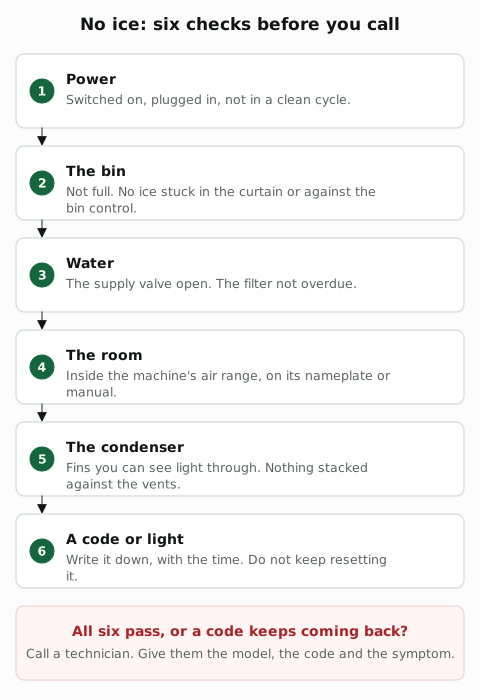
Before you call for repair, check six things: the power, the bin, the water supply and filter, the room temperature, the condenser, and any code on the display. Those cover what an owner can safely fix.
A machine that still makes no ice, or shows the same code again after one reset, needs a technician. Tell them the model, the code and what you saw.
Six checks cover what an owner can safely fix
Power and the switch
- Check: the machine is switched on and plugged in, and not left in a clean cycle.
- Should be: on, with no clean light lit.
- What to do next: if it was off, switch it on and wait for a batch. If it trips the breaker, leave it off and call. Never keep resetting a machine that trips.
The bin and the curtain
- Check: the bin is not full, the water curtain swings freely, and no ice is stuck against the bin control.
- Should be: room in the bin, and a curtain that hangs closed.
- What to do next: clear stuck ice by hand. Never chip ice off with a tool. If the bin is empty and the machine still says full, the bin control needs a technician.
The water and the filter
- Check: the supply valve to the machine is open, the line is not kinked, and the filter cartridge is inside its date.
- Should be: valve open, cartridge within its date or gallons.
- What to do next: open the valve or replace an overdue cartridge, then wait for a batch.
The room temperature
- Check: the air around the machine is inside its range, on the nameplate or in the manual.
- Should be: for example 35°F to 110°F (1.6°C to 43.4°C) on Manitowoc's S320 and S420, 45°F to 100°F (7°C to 38°C) on Hoshizaki KM cubers, 50°F to 100°F (10°C to 38°C) on Scotsman Prodigy.
- What to do next: if the room is hotter, move heat sources away and give the machine air. If it cannot be fixed, the machine is in the wrong place.
The condenser on an air-cooled machine
- Check: the condenser fins are clean and nothing is stacked against the vents.
- Should be: fins you can see light through, and the clearance the manual gives. One Manitowoc model asks for 5 inches (13 cm) at the top and sides and 8 inches (20 cm) at the back.
- What to do next: switch off before cleaning near the fan. Vacuum or brush the fins gently, as Follett's manual describes, then switch back on.
A code, a light or beeps
- Check: what the display, the lights or the beeps say.
- Should be: no code. A code means the control stopped the machine on purpose.
- What to do next: write the code down with the time. Look it up on the maker's page below, then call if it comes back after one reset.
What you see usually points to the cause
What you see | What it usually means | Where to look |
|---|---|---|
No ice at all | Off or in a clean cycle, the bin full or the curtain stuck, the water off, the room out of range, or a safety stop | |
Slow batches, less ice | A dirty condenser, scale on the plate, a hot room or warm water coming in | |
Thin, small or shallow cubes | Too little water: a clogged filter, a dirty inlet screen or low pressure; or scale on the plate | |
Cubes thin or missing on one side of the slab | Scale in the distribution tube's holes, so the water runs unevenly over the plate | A clean, with the tube taken out and descaled |
Soft or cloudy ice | Poor incoming water, poor filtering, a dirty machine, a dirty inlet screen | |
A code, lights or beeps | A safety limit stopped the machine: a long freeze, a long harvest, a water problem |
Manitowoc's manuals give that list for soft or cloudy ice. Warm incoming water slows the freeze too: Hoshizaki's KM cubers want water between 45°F and 90°F (7°C to 32°C).
A cube machine has two cycles, and most faults stretch one of them
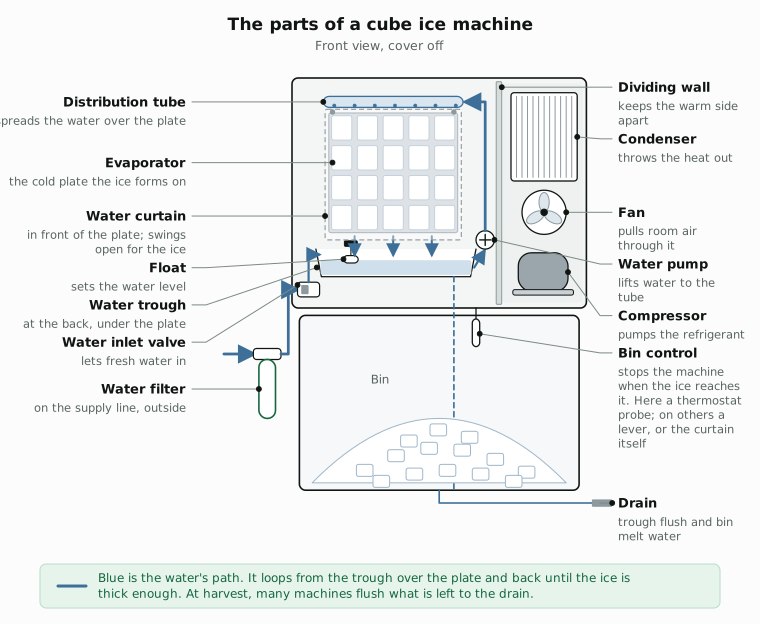
The machine freezes water on a cold plate, then warms the plate to drop the ice. A dirty condenser or scale makes the freeze longer. A part that stops the plate warming or the slab falling makes the harvest longer. The control times both, and stops the machine when one runs too long too often.

A code names the limit the machine hit
- Scotsman Prodigy: code 1 is a long freeze, code 2 a long harvest. Flashing means it is retrying; steady means it has shut down. The Scotsman page has the letters too.
- Hoshizaki KM: one beep is a high evaporator temperature, two a long harvest, three a long freeze. The Hoshizaki page has the causes.
- Manitowoc: safety limit 1 is a long freeze and safety limit 2 a long harvest. The Manitowoc page has the limits.
- Ice-O-Matic Elevation: code 7 is a water problem. The Ice-O-Matic page has the reset.
Reset once. If the code comes back, stop and call. A machine that keeps hitting a limit has a fault the reset does not fix.
What to tell the technician
- The model and serial number, from the nameplate.
- The code, lights or beeps, and when they started.
- What you see: no ice, slow ice, thin or cloudy cubes.
- When it was last cleaned and when the filter was last changed.
- The room temperature near the machine.
Owners never touch the refrigerant, the wiring or the control board. Those are a technician's work.
SiteWise keeps the ice machine's PM on schedule and the history in one place
When a machine stops, the fix goes faster if the technician sees the code, a photo and the last clean before they arrive.
And this is one machine. It also needs a clean, a sanitize, the bin, the filter and the condenser, each on its own interval. A kitchen or a site often has 10 to 15 machines like it, each with a list of its own. A paper checklist on the wall cannot keep that many dates, and it cannot tell anyone when one is missed.
SiteWise keeps all of it on your phone, in a free app. Yes, really free: the free plan has unlimited work orders (100 open at a time), 20 locations and 250 assets, far more than 15 machines.


Or open renergytech.com/download/sitewise on your phone.
SiteWise is a CMMS (a computerized maintenance management system): software that holds the assets, schedules the PMs, issues the work orders and keeps the history.

- The PM. Set the clean every 6 months, or the interval your manual gives. SiteWise creates the work order a set number of days before it is due, or schedules the next one from when the last was done.
- The procedure. Attach the maker's steps, with photos, to the PM, so whoever does the clean uses the right cleaner at the right amount.
- The parts. Keep cleaner, sanitizer and filter cartridges as parts with a minimum per storeroom. SiteWise reserves the parts for a planned PM 30 days ahead.
- On the phone. Technicians create, update and close work orders and PMs offline, on every plan, add photos and videos up to 30 seconds, and scan the machine's QR code to open its history.
Open a work order from the phone with a photo or a 30-second video, set its priority, assign it, and close it when the machine is back, with the history kept on the asset.
Download the PM schedule above as a spreadsheet: ice machine PM schedule (CSV). The plans are on the SiteWise page.