
Ice-O-Matic ice machine maintenance and repair
By Vimal Bhaya, Founder and Lead Systems Architect · Last reviewed 5 November 2026
This is a continuation of Ice machine maintenance by brand, a 4-part tutorial. You are on part 4 of 4.
Clean and sanitize an Ice-O-Matic every six months, but not more than once a month. Use a nickel-safe cleaner and a nickel-safe sanitizer. Throw away the first two batches after each.
On an Elevation Series (CIM) machine, error code 7 means a water problem. The machine stopped so it would not run with no water on the plate. Hold POWER and CLEAN for 3 seconds to reset it.
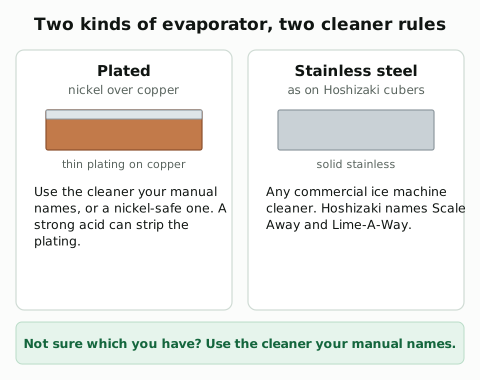
Ice-O-Matic requires a nickel-safe cleaner and a nickel-safe sanitizer
- The cleaner: nickel-safe, such as Nu-Calgon Nickel-Safe Ice Machine Cleaner, diluted as its label says.
- The sanitizer: nickel-safe too, such as Nu-Calgon IMS-III, after the cleaner is thoroughly rinsed out.
- The warranty: the wrong cleaner or sanitizer can void it, Ice-O-Matic warns. So can reverse osmosis water without a neutral pH.
- How often: every six months, but no more than once a month.
The Elevation clean: a harvest, CLEAN, cleaner, rinse, sanitize
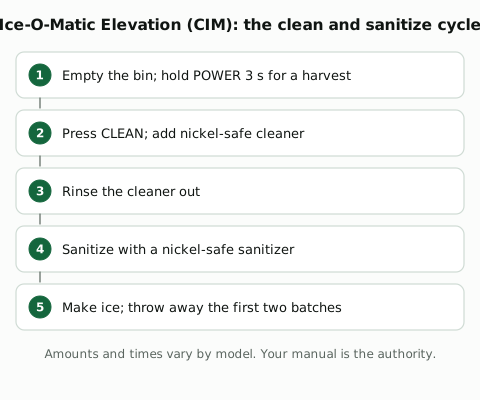
- Start: remove all the ice, press and hold POWER for 3 seconds for a manual harvest, then press CLEAN.
- Older ICE Series machines use an ICE, OFF and WASH switch instead. Follow the sheet for your model.
- Afterwards: throw away the first two batches of ice after cleaning, and again after sanitizing.

Error code 7 means the machine found no water on the plate
Ice-O-Matic's service bulletin says a newer control board added code 7 for a water problem. The machine stops so it does not run with no water on the plate. It shows as a quick triple flash, red and yellow, over and over.
- Causes in the bulletin: a faulty water pump, a high float switch stuck, a leaking inlet valve.
- Owner checks first: the water supply valve open and the filter not clogged.
- The reset: hold POWER and CLEAN together for 3 seconds. Reset once; if code 7 comes back, call a technician.
The other codes depend on which control board the machine has. Ice-O-Matic's CIM service manual, on its manuals and guides page, has the full list. Its service line is 1-800-423-3367.

IFQ filters, changed every six months

Ice-O-Matic's IOMQ cartridges for its IFQ systems are rated for six months. The filters page has the rest.
Ice-O-Matic's manuals are on its Service and Support page
Ice-O-Matic's Service and Support page links its manuals and guides, a parts lookup and a technician locator.
The Ice-O-Matic PM schedule
Task | How often | Who | Notes |
|---|---|---|---|
Clean and sanitize the water system | Every 6 months for most makers (Hoshizaki KM: at least yearly), or the manual's interval. More often with hard water | Trained staff or a service company | Use the cleaner and sanitizer the manual names. Never mix them |
Wash the bin | At each clean | Trained staff | With the solution the manual gives |
Throw away the first batches after a clean | At each clean | Trained staff | Ice-O-Matic says the first two batches after cleaning, and again after sanitizing |
Change the water filter cartridge | On its date or its gallons, whichever comes first | Trained staff | Write the date on the cartridge |
Check and clean the air-cooled condenser | At each clean, or as the manual says (some makers say monthly) | Trained staff, power off | Vacuum or soft brush |
Check the condenser air filter, where fitted | Twice a month (Hoshizaki KM-255BAH) | Anyone | Rinse or replace as the manual says |
SiteWise keeps the ice machine's PM on schedule and the history in one place
Ice-O-Matic sets a floor and a ceiling: every six months, but no more than once a month. A schedule keeps you inside both.
And the clean is one job on one machine. The same machine needs a sanitize, the bin washed, the filter changed and the condenser kept clear, each on its own interval. A kitchen or a site often has 10 to 15 machines like it, each with a list of its own. A paper checklist on the wall cannot keep that many dates, and it cannot tell anyone when one is missed.
SiteWise keeps all of it on your phone, in a free app. Yes, really free: the free plan has unlimited work orders (100 open at a time), 20 locations and 250 assets, far more than 15 machines.


Or open renergytech.com/download/sitewise on your phone.
SiteWise is a CMMS (a computerized maintenance management system): software that holds the assets, schedules the PMs, issues the work orders and keeps the history.

- The PM. Set the clean every 6 months, or the interval your manual gives. SiteWise creates the work order a set number of days before it is due, or schedules the next one from when the last was done.
- The procedure. Attach the maker's steps, with photos, to the PM, so whoever does the clean uses the right cleaner at the right amount.
- The parts. Keep cleaner, sanitizer and filter cartridges as parts with a minimum per storeroom. SiteWise reserves the parts for a planned PM 30 days ahead.
- On the phone. Technicians create, update and close work orders and PMs offline, on every plan, add photos and videos up to 30 seconds, and scan the machine's QR code to open its history.
Download the PM schedule above as a spreadsheet: ice machine PM schedule (CSV). The plans are on the SiteWise page.